
Check every Microsoft 365 tenant, and fix what's wrong.
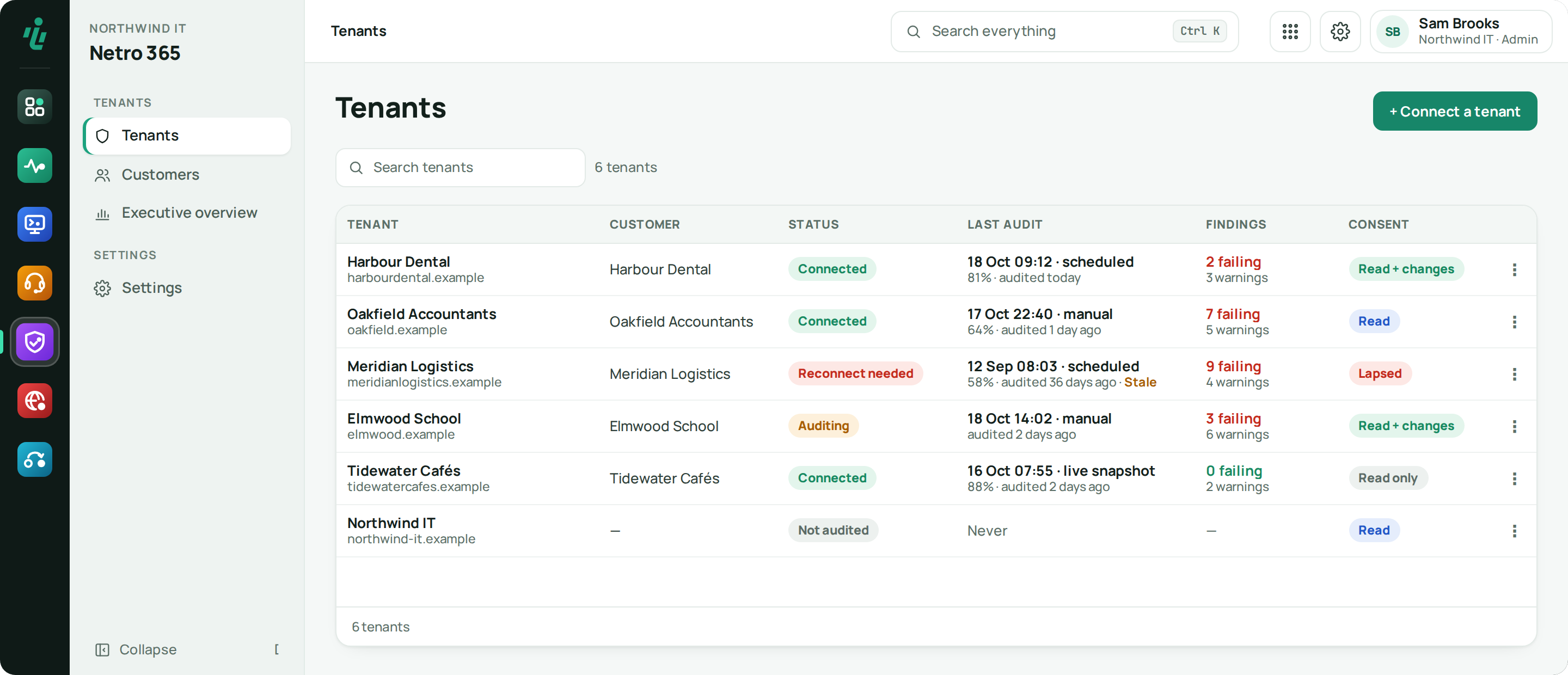
Connect a customer's tenant with one Microsoft sign-in. Netro 365 checks Entra ID, Conditional Access, Intune, Secure Score and Exchange Online without changing anything, shows what changed since last time, and offers fixes you can apply and undo.
Price From €12 per Microsoft 365 tenant (50 users included) · minimum €29 / month · from €0.25 per user above 50 per tenant. See pricing
Who uses Netro 365.
MSPs
Every customer's tenant checked against the same baseline, kept separate, and reported under your brand.
IT teams
A scored view of your own tenant's security, and what changed since last time.
Security reviewers
Evidence for every finding, history for every run and a PDF your board or auditor can read.
What Netro 365 does.
-
Step 01
Scored findings
Each finding has a risk score and advice on how to fix it.
-
Step 02
Fixes you can undo
Pick the fixes you want and apply them with a fresh Microsoft sign-in — no stored key can change a tenant. Each fix is checked afterwards and can be undone where Microsoft allows it; when it cannot, it says so before you apply it.
-
Step 03
See what changed
Run the audit again and see every change: the old value in red, the new one in green.
-
Step 04
Many tenants, kept apart
Connect as many customer tenants as you need. Each one is kept separate and its sign-in tokens are stored encrypted.
-
Step 05
Branded reports
Give your customer a PDF report with your logo. Findings, licence usage and other lists export to CSV.
Also in Netro 365
Checks that only read
Audits don't change anything. The tenant only changes when you choose to apply a fix.
Pick your checks
Entra ID, Conditional Access, Intune, Secure Score and Exchange Online — including guest accounts, admin accounts and missing MFA.
Mail domain checks
SPF, DKIM, DMARC and MX records checked from the outside, next to the tenant audit.
Licences and stale users
Licences in use and left unused, and accounts that have not signed in for a long time, read from the last audit. When Microsoft did not answer, it says why instead of showing an empty list.
Live changes
Turn monitoring on for a tenant and changes made between audits show up in Live changes, with an e-mail when one weakens security.
Getting started
Connect the tenant
An administrator of that tenant signs in with Microsoft once to give read access.
Choose the checks
Pick which areas to check for that customer.
Review the findings
Findings are scored and compared with the previous run.
Fix and report
Apply the fixes you pick, check them, and give the customer a branded PDF.
Works with what you already use.
- Microsoft Graph
- Microsoft Entra ID
- Microsoft Intune
- Microsoft Secure Score
- Exchange Online
- Public DNS (SPF / DKIM / DMARC / MX)
- Netro Dashboard sign-in
Frequently asked questions
Does Netro 365 change anything in my tenant?
No. Audits only read. A change only happens when you pick a fix and apply it with a fresh Microsoft sign-in; every fix is checked afterwards and can be undone where Microsoft allows it.
Can I audit many customers' Microsoft 365 tenants?
Yes. Connect as many customer tenants as you need. Each tenant is audited on its own and kept separate from the others, and its sign-in tokens are stored encrypted.
How is a customer tenant connected?
An administrator of that tenant signs in with Microsoft once. Tokens are stored encrypted and every tenant is kept separate from the others.
Can I see what changed since the last audit?
Yes. Each run is compared with the previous one, with the old and new value side by side.
Can I give the report to my customer?
Yes. Reports carry your branding and download as PDF.
Try Netro 365 free for 14 days
Every account starts with a 14-day trial of every app, no card needed, and goes straight into a setup wizard. Or let our engineers run it for you.