
One login, one customer list, one bill.
Sign in once — with a password and 2FA, Microsoft or Google — and open IQ, RMM, Helpdesk, Netro 365, Netro DNS and Migrate without logging in again. Your customers, team, branding and subscription are all managed here.
Price Comes with every app, at no extra cost. See pricing
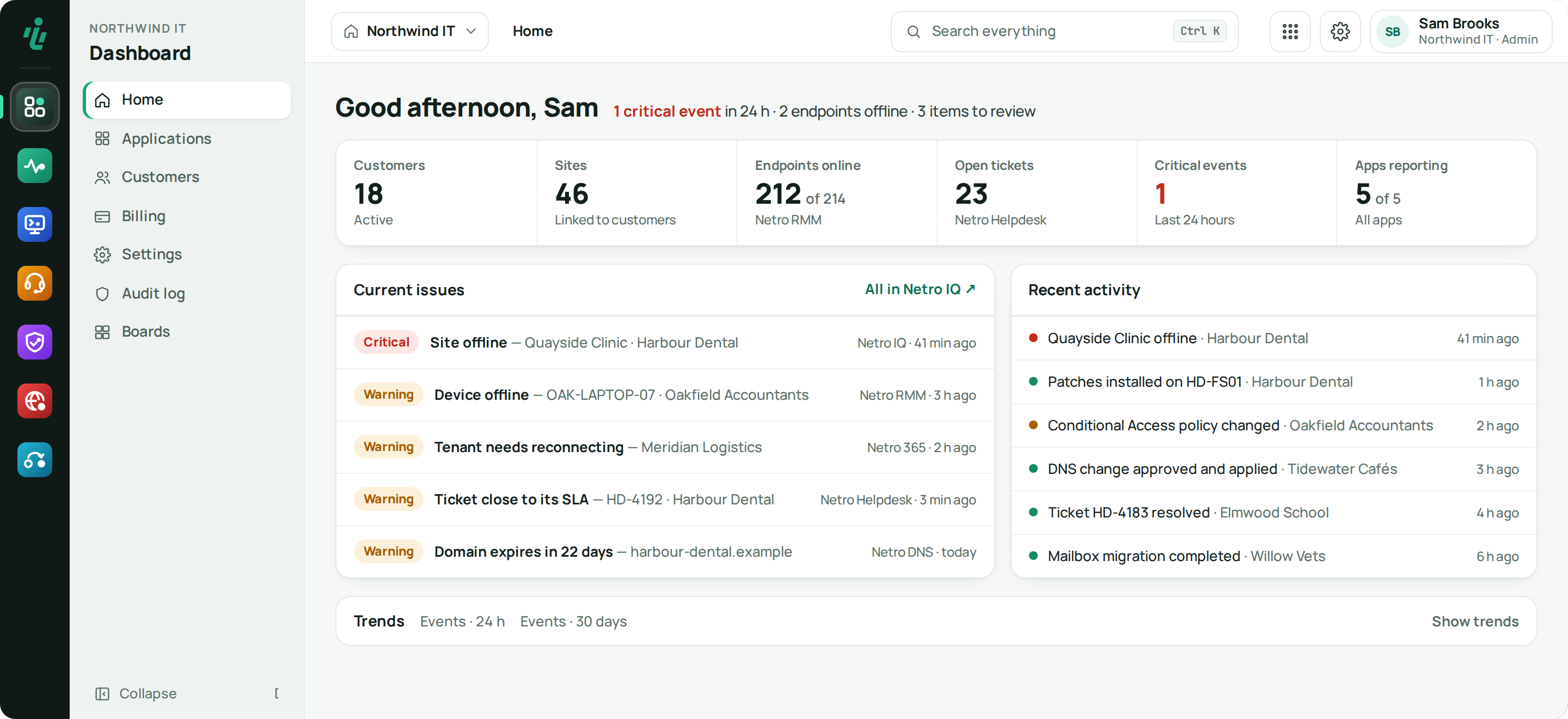
Who uses Netro Dashboard.
MSPs
One customer list for every app, what each customer is entitled to, and your brand on all of it.
IT teams
One login and one set of users, roles and 2FA for all the apps.
Resellers
One place to see the customers and subscriptions you're responsible for.
What Netro Dashboard does.
-
Step 01
Single sign-on
Sign in once and move between apps. When your session ends, you sign in again here — not in each app.
-
Step 02
Shared customers
Add a customer once; every app uses the same list.
-
Step 03
Your branding
Set your logo, colours, font and product names once. Every app uses them.
-
Step 04
Alerts you choose
Each person picks which alert e-mails they get from every app, sends themselves a test e-mail, and sees whether each alert e-mail was sent, held, not sent or failed.
-
Step 05
Help and support
Help & support sits in the account menu of every app. Inetro support can look into your organisation only after you allow it, for a set time and tied to your message.
-
Step 06
One subscription
Try the apps for free, then pay for everything in one subscription. Each app's limits follow your plan.
-
Step 07
Overview and office screen
Home says in one line what needs attention, shows one strip of figures from every app and current issues beside recent activity. Boards put the same on the office screen, through a display link you can revoke.
Also in Netro Dashboard
More than one organisation
Work for more than one organisation? Switch between them from the top left without signing out.
Users and access
Invite your team and your customers' users and manage their roles in one place. Everyone signs in with two-factor.
Key vault
Vendor keys, such as your UniFi keys, are stored here and passed to the apps that need them.
One AI key
Add your own AI provider key once, with a monthly spending cap and rules for what data the AI may use.
Getting started
Sign up
Start a 14-day trial of every app, no card needed. A setup wizard then walks you through the rest.
Add your team and customers
Invite users and add your customers once. Everyone sets up two-factor at first sign-in.
Connect your vendors
Store your vendor keys once; IQ, RMM and the other apps pick them up.
Add your brand
Upload your logo and colours; every app follows.
Works with what you already use.
- Microsoft Entra ID sign-in
- Google Workspace sign-in
- Authenticator-app 2FA (TOTP)
- Netro IQ
- Netro RMM
- Netro Helpdesk
- Netro 365
- Netro DNS
- Netro Migrate
Frequently asked questions
Do I need a separate login for each app?
No. You sign in to the Dashboard once and every app opens without another login.
Can my customers log in?
Yes. You can invite your customers' users, each with their own role and permissions.
Is there a free trial?
Yes. Every account starts with a 14-day trial of every app, no card needed. You choose a plan from Billing in the Dashboard when you are ready.
Can I use my own branding?
Yes. Set your logo, colours, font and product names once and every app uses them.
Is Inetro self-hosted?
No. Inetro hosts the Dashboard and every app. You use them in your browser; there are no servers of your own to install or keep up to date.
How are my customers' environments kept apart?
Each customer's data is kept apart, and each customer only ever sees their own. There is 2FA on every login, keys and tokens are stored encrypted, and every action is written to an audit log.
Try Netro Dashboard free for 14 days
Every account starts with a 14-day trial of every app, no card needed, and goes straight into a setup wizard. Or let our engineers run it for you.