
See every customer network in one place.
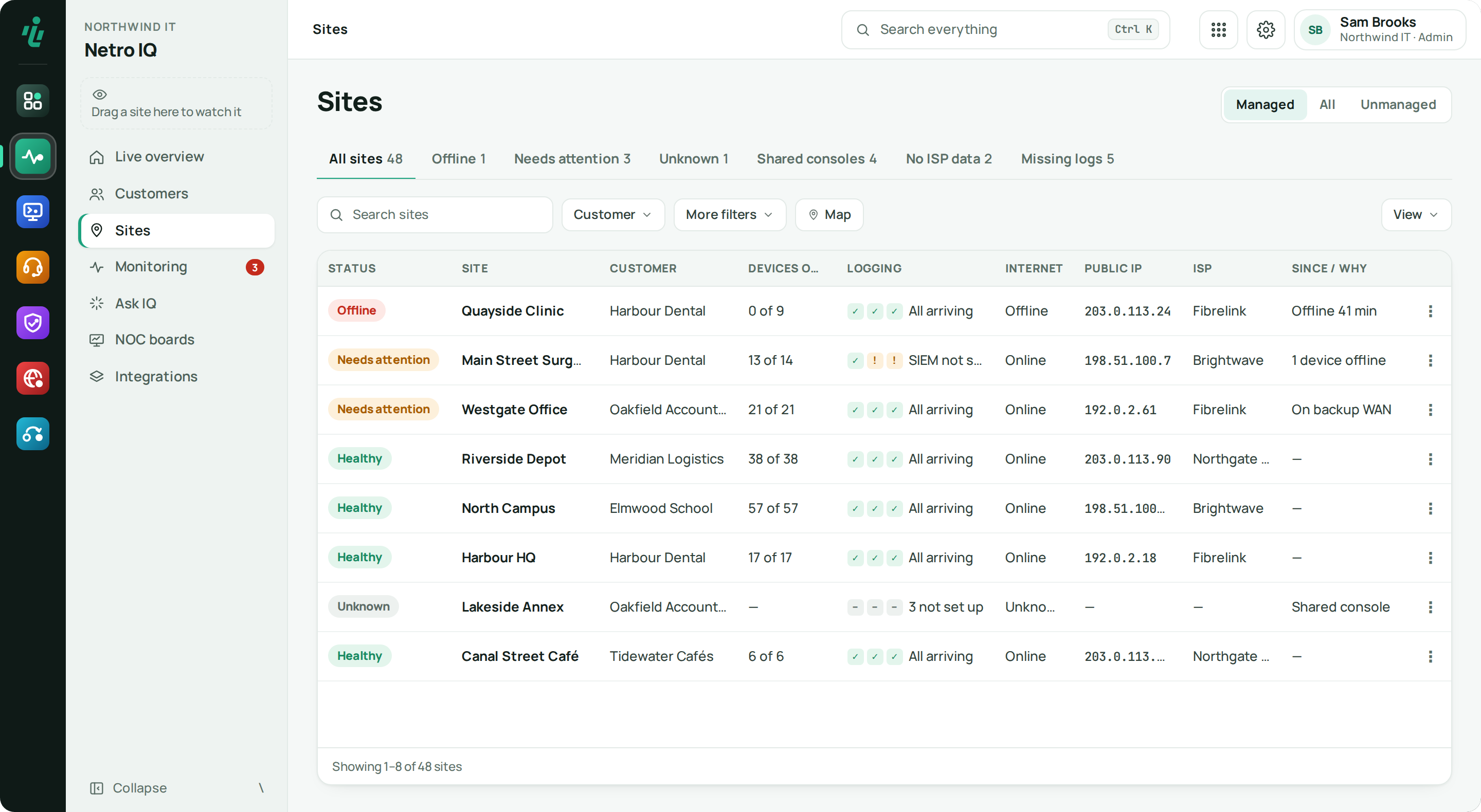
IQ shows which sites need attention and why, keeps a record of every outage and writes down each site's configuration every night. It works with UniFi, MikroTik, Meraki and Omada.
Price From €9 per managed site · minimum €29 / month. See pricing
Who uses Netro IQ.
MSPs
All your customers' networks in one list, while each customer only ever sees their own.
IT teams
Your own offices and locations, without a customer layer in the way.
Resellers
The networks you're responsible for, with the same status and documentation as the MSPs you work with.
What Netro IQ does.
-
Step 01
A clear status per site
Every site is healthy, needs attention, critical, offline or unknown, with the reason written out. Each outage gets a start and end time, what proved it, and whether anyone was emailed.
-
Step 02
One page per customer
Every customer is one row: the worst site's status, sites and devices online, clients. Open one and a sentence says how they are doing right now, three numbers follow, then only what needs attention — and their printers and UPSs with toner and battery levels as the device reports them.
-
Step 03
Internet and backup lines
IQ only calls a line up when it has proof. A backup line that is set up but never confirmed working is shown as unverified.
-
Step 04
One monitoring feed
Alerts, device health, syslog, internet quality and support-file findings in one list, grouped by site, by when it happened or by issue type. Each row names the device once, and an alarm that keeps repeating folds into one row. Acknowledge, snooze or ignore it from its menu — an acknowledged item comes back when it gets worse.
-
Step 05
NOC boards for the office screen
Full-screen, read-only boards of offline sites, recent outages and sites that need attention — for every customer or one, with the sites you choose and devices you pin. Share one with a display link you can revoke.
-
Step 06
Ask IQ
Ask a question in plain English. IQ answers from its own records for that customer, and anything it wants to change waits for your approval.
-
Step 07
Documentation every night
Networks, Wi-Fi, firewall, VPN and more are recorded every night. Each change is written as a plain sentence: what changed, from what to what, and when. Export to PDF, Markdown, CSV or JSON — passwords are always masked.
-
Step 08
New sites get your standard
Save a site's setup as the customer's standard. A site that joins later is listed with what it is missing, and one guided step adds it — networks, Wi-Fi and firewall rules — with undo. When a site cannot be set up yet, IQ says why and what to do.
-
Step 09
Guest Wi-Fi portal
Give each customer — or each site — its own branded guest Wi-Fi page: logo, colours, texts in English and Dutch, the fields you want, terms to accept, and sign-in with Google, Microsoft or Facebook. Set time and data limits and opening hours, see who connected and when, export the guest list, and push the portal to a UniFi Wi-Fi network — or let IQ create a guest network for it — with undo.
-
Step 10
IP plan by role
See every site's networks by role — office, POS, guests, management — in one grid against your plan, what each site has to change to follow it, and export it to Excel.
Also in Netro IQ
Honest about shared consoles
UniFi only lets a console's owner read its data. IQ marks those sites as shared, shows UniFi's own device count instead of zero, and documents them from the console screens.
Changes you can undo
Restart devices, block clients or push a firewall rule to many sites at once. Each change is checked first; client blocks and firewall rules can be rolled back.
MikroTik, three ways
Connect directly, let routers behind NAT report in, or use a WireGuard tunnel for full management. Routers can never reach each other.
Getting started
Add your keys
Add your UniFi keys once in the Dashboard, and Meraki or Omada details on IQ's Integrations page. IQ finds every site they can see.
Link sites to customers
Assign each site to a customer. IQ tells you when a console is only shared with you.
Monitoring starts
Alerts go to the people and channels you choose, with quiet hours and maintenance windows respected.
Documentation every night
Each night IQ records every site's configuration and notes what changed.
Works with what you already use.
- UniFi Site Manager & Network API
- UniFi Protect / Network alarm webhooks
- UniFi guest portal (external portal server)
- MikroTik RouterOS (direct, dial-in or WireGuard)
- Cisco Meraki
- TP-Link Omada
- Syslog / SIEM
- Email, Slack, Teams & webhook alerts
- Public API + webhooks for PSA / CRM tools
- Netro Dashboard sign-in
Frequently asked questions
Which network vendors does Netro IQ support?
UniFi is fully supported. MikroTik works over a direct connection, dial-in or a WireGuard tunnel. Cisco Meraki and TP-Link Omada are read-only: their sites and devices appear in the same lists, with the same status.
What about UniFi consoles that are only shared with my account?
UniFi's API only serves a console's owner. IQ marks those sites as shared, shows UniFi's own device count instead of claiming zero devices, and documents their setup by reading the console screens (read-only).
Does IQ store Wi-Fi passwords or RADIUS secrets?
No. Secrets are masked when a configuration is stored, and again when it is shown or exported. The documentation says “passphrase: set”, never the value.
Can I put IQ on a TV in the office?
Yes. The wallboard is a full-screen, read-only view. An admin creates a display link valid for 1 to 90 days. It can only show monitoring data and can be revoked at any time.
What can Ask IQ do?
Ask IQ answers questions from IQ's own records for the customer and site you're looking at. It is read-only by default; if it suggests a change, you approve or deny it first. The AI key and rules are set once in the Dashboard.
Where do IQ's uptime figures come from?
From IQ's own outage records, not from the vendor's percentages. Uptime is kept apart from the current status, and reads “No history” when nothing was measured — never 100%.
Can one customer see another customer's networks?
No. As an MSP you see all your customers' networks in one list, while each customer only ever sees their own.
Can IQ run the guest Wi-Fi page for a UniFi network?
Yes. You design the page in IQ and push it to one of the site's Wi-Fi networks, or let IQ create a separate guest network and Wi-Fi for it. Guests are let online through UniFi's own guest authorisation, with the time and data limits you set. The pushed settings can be undone.
Is Netro IQ hosted, or do I install it myself?
Inetro hosts it. You open IQ in your browser and sign in through the Netro Dashboard; there is no server of your own to run.
Try Netro IQ free for 14 days
Every account starts with a 14-day trial of every app, no card needed, and goes straight into a setup wizard. Or let our engineers run it for you.